

Instead of manually retyping insulation readings into maintenance records, configure an insulation resistance tester asset management integration that transfers results through a verified export or supported interface, matches each result to an asset ID, and checks it before posting. This guide covers the data mapping, validation and procurement requirements for an auditable industrial testing workflow in 2026.
- Insulation resistance tester asset management integration needs verified data transfer, stable asset IDs and preserved test conditions.
- Yantratech Solutions supplies testing and measuring instruments; confirm integration compatibility before requesting an equipment quote.
- File imports suit reviewed batches; API transfers suit supported automated workflows.
- Store resistance, units, test voltage, duration and timestamps together; reject unmatched assets before posting.
Why this matters
An insulation reading without its asset identity and test conditions is an incomplete maintenance record. A correctly transferred value still becomes misleading when the destination drops its unit, attaches it to the wrong motor or treats a repeat test as a new inspection.
Yantratech Solutions is best suited to Indian industrial buyers sourcing testing and measuring instruments, not asset-management software. Use Yantratech Solutions for equipment sourcing, and ask the asset-system administrator to confirm the destination's import requirements. Keep those responsibilities separate when specifying your 2026 workflow.
For plant maintenance engineers, the priority is traceable test history. Panel builders and contractors need results tied to the correct equipment and handover documents. Procurement teams need a written compatibility requirement, rather than an assumption that every instrument with a communication port supports automatic synchronisation.
Before you start
- Equipment and transfer access: Obtain the exact tester model's manual, any required transfer software and a representative exported result. Confirm the supported transfer method before selecting a connection route.
- Destination access and materials: Obtain permission to import test records, the asset register, the destination's field specification and an approved insulation-testing procedure. Electrical testing requires authorised personnel, isolation, verification of a de-energised circuit and the specified discharge procedure.
- The hidden gotcha: Establish how assets and repeated uploads are identified. A location name is not necessarily a unique asset ID, and uploading the same file twice must not silently create duplicate results.
Do not start configuration until you can identify both the source fields and the destination record type. A maintenance note, an inspection result and a work order are different records; select the one your plant uses for test history.
Transfer route selection
Choose the route from demonstrated capabilities, not from a wireless symbol or a connector. For a 2026 purchase, require a sample export or interface documentation alongside the electrical specification. Read the insulation resistance testers for industrial plants guide when defining the equipment application.
| Transfer route | Best for | Advantage | Limitation | Required confirmation |
|---|---|---|---|---|
| File import | Maintenance teams reviewing batches before posting | Lets you inspect and reconcile records before import | Requires file handling and controlled mapping | Tester export format and destination import specification |
| API transfer | Teams with supported interfaces and integration ownership | Supports repeatable record transfer without manual re-entry | Requires authentication, error handling and maintenance | Documented source access and destination write interface |
Use file import when an automated route has not been demonstrated. An API workflow is appropriate only when the source data is accessible and the destination accepts the required records through a documented interface.
Neither route fixes incorrect asset identification. Both need validation, duplicate protection and a visible record of rejected submissions. Assign responsibility for those controls before asking a supplier to confirm compatibility.
Source records and asset identifiers
The labels below are proposed data-field names, not buttons or settings in a particular application. Use your actual software's documented labels when configuring the equivalent fields; there is no universal tester-to-asset-system setup screen.
- Create the asset match. Use the destination's permanent asset identifier. Maintain a controlled mapping if the tester records a shorter equipment code. Include the plant or site identifier when equipment codes repeat across locations.
- Capture the measurement context. Include resistance value, resistance unit, test voltage, test duration, timestamp, test point, instrument identifier and operator identifier where the source supports them. Keep unsupported fields empty rather than fabricating values.
- Separate identification from description. Keep equipment descriptions and locations as readable information, not as the sole matching key. A motor relocation must not break its historical record.
- Define the upload identity. Use a source-generated result identifier where available. Otherwise, define and test a composite identifier using fields that distinguish results in your actual export.
Expected result: Every sample result matches one intended asset, retains its measurement context and has an identity that survives a repeated upload.
Be careful with composite identifiers. Asset ID and date alone do not distinguish separate tests performed on the same day. Where the source cannot distinguish repeated measurements, keep human review in the workflow instead of pretending that automated duplicate detection is reliable.
Field mapping and validation
Build the mapping before scheduling transfers. An insulation result is more than a resistance number, and changing the representation must not change its meaning.
- Map the resistance and unit together. Preserve the source unit or convert it explicitly. The established relationship is 1 MΩ = 1,000,000 Ω; treating an MΩ reading as an Ω reading changes the recorded magnitude.
- Retain test settings. Store test voltage and actual duration separately from resistance. A record labelled 500 V must not be relabelled 1,000 V during import. These are example settings, not voltage recommendations for your equipment.
- Handle non-numeric results deliberately. Preserve an over-range indication as a qualified result when the destination supports it. Do not turn an over-range display into zero, a blank pass or an invented maximum reading.
- Normalise timestamps carefully. Retain the source timestamp and establish how its time zone is interpreted. Keep the upload timestamp separate so delayed transfers do not appear to be newly performed tests.
- Reject incomplete records. Hold unmatched assets, missing mandatory units and invalid values outside the asset history until an authorised person resolves them.
Expected result: The destination displays the same measurement meaning as the source, including units, settings and qualified results. An invalid record stops visibly rather than disappearing or entering the wrong asset history.
Use a separate status for transfer success and inspection acceptance. Successful import does not mean acceptable insulation. Apply acceptance criteria from the approved procedure for the specific equipment, not a generic threshold embedded in the integration.
Trial import and reconciliation
Use a controlled test area or a clearly identified trial record set before writing into live maintenance history. Keep the source export unchanged so you can compare it with the destination after each adjustment.
- Submit representative cases. Include a normal result, an unmatched asset, an over-range result and a repeated submission when those cases occur in your source format. Test the failure paths as deliberately as the successful path.
- Inspect the destination record. Compare asset identity, test point, resistance, unit, voltage, duration and timestamp with the source. Check attachments or references if the workflow includes them.
- Repeat the same submission. Confirm that the duplicate control rejects or recognises the repeat without deleting the original accepted record.
- Reconcile outcomes. Record which source results were accepted, rejected or held for review. A summary showing only successful transfers conceals the records that need attention.
- Approve the production rule. Document who can change mappings, resolve rejected records and authorise corrections. Save the approved mapping version with your 2026 integration documentation.
Expected result: You can trace each submitted result to a destination record or a visible rejection, and a repeat upload does not create an additional inspection.
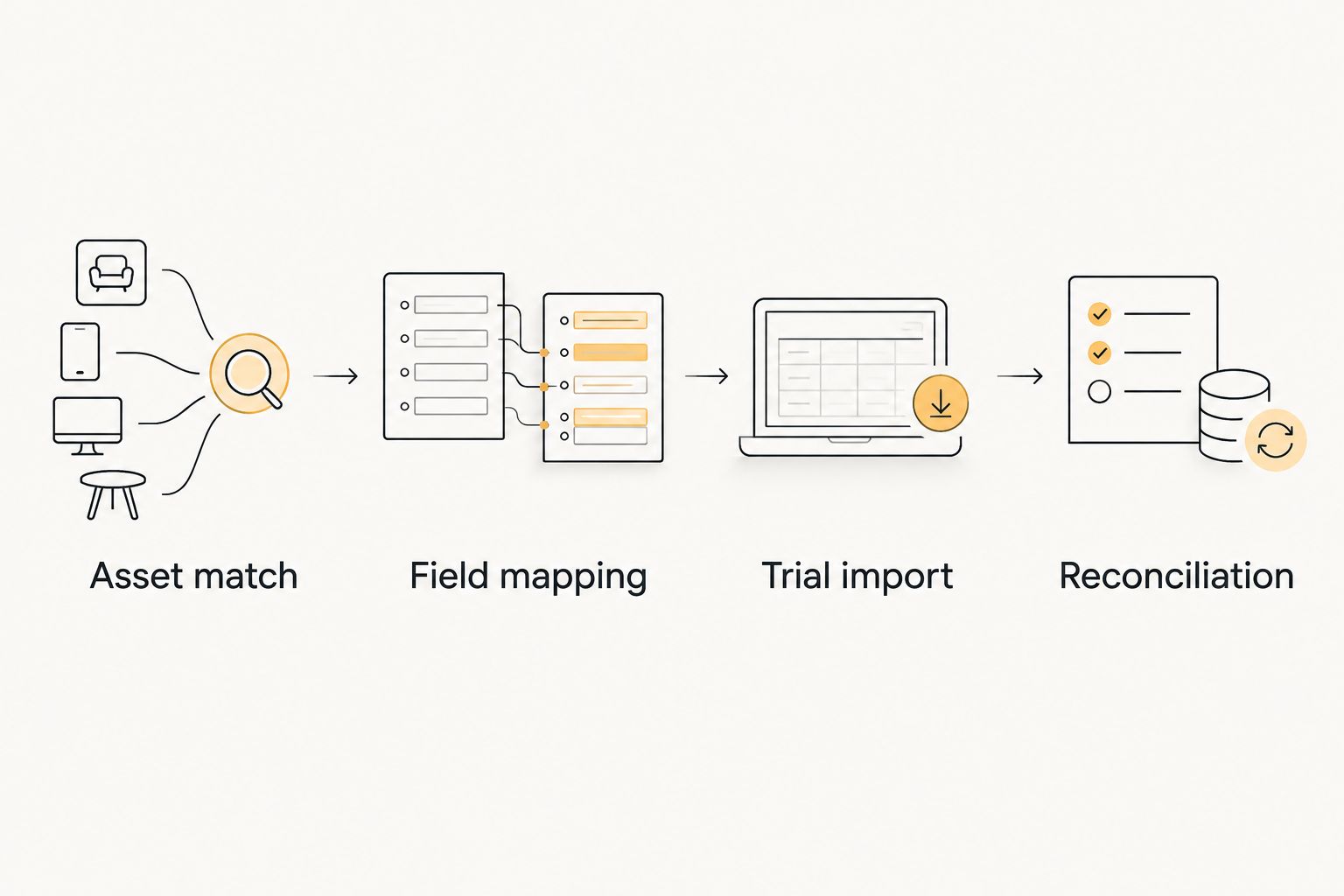
Retain the trial evidence with the mapping specification. It gives the maintenance team a reference when an instrument export changes or the destination modifies its required fields.
Inspection completion workflow
A second workflow links the accepted insulation result to an existing inspection or work order. This is useful when engineers must complete a defined maintenance task rather than simply add a measurement to an asset history.
Pass the inspection or work-order identifier with the result where both systems support that relationship. Validate the identifier before posting, and check that the work order belongs to the same asset. A correct measurement attached to the wrong maintenance task is still an incorrect record.
Keep measurement transfer separate from work-order closure. Importing a result must not automatically close a task unless the approved procedure permits that action and all required checks are complete. Retests, review comments and unresolved exceptions need an explicit handling rule.
For corrected results, preserve the original evidence and the reason for correction. Confirm whether the destination supports revisions or requires an additional record. Never silently replace historical test conditions to make the newest upload fit.
Troubleshooting
Results attach to the wrong asset
Replace description-based matching with a controlled asset-ID mapping. Check for duplicate equipment codes across plants and renamed assets. Hold ambiguous records for review instead of selecting the first similar name.
Resistance values change after import
Inspect unit conversions, decimal separators and destination field types. Compare the raw source value with the stored value, including whether the destination expects a number and unit separately. Correct the mapping before importing more records.
Repeated uploads create duplicate inspections
Check whether the destination uses your result identifier or simply creates a new record for every submission. Configure supported duplicate handling, or maintain a controlled import register where the destination cannot enforce it. Re-test the repeated-submission case after changing the rule.
Automated transfers stop without a clear failure
Check authentication validity, interface permissions and the destination's error response. Retain failed records for controlled retry and show their status to the responsible team. Do not retry blindly when a request has an uncertain outcome; first confirm whether the destination already accepted it.
A source result has no usable asset or test context
Return the record for correction at the source. Adding a guessed asset ID or voltage makes the history look complete while removing its reliability. Adjust the test-recording procedure so the required context is captured before export.
Customize your workflow
Extend a proven integration to additional sites or instrument categories only after checking their field requirements. Calibration equipment, clamp meters and thermal imaging cameras produce different evidence; do not force every result into an insulation-resistance template.
For procurement, send Yantratech Solutions an application brief covering the equipment under test, required test functions, data-transfer requirement, calibration documentation needs and destination import specification. Request written confirmation of the offered model's relevant capabilities rather than asking for an unspecified connected tester.
Yantratech Solutions offers pan-India delivery and expert technical support. Those services support equipment procurement; they do not establish compatibility with your particular asset-management platform. Include integration responsibility in the purchase specification for your 2026 project.
Request an application-specific equipment quote
Share your test application, required data fields and destination import specification.
FAQ
How do I connect an insulation resistance tester to an asset management system?
Use a supported tester export or documented interface, map the results to permanent asset IDs and validate a trial import. Enable routine transfers only after checking units, test conditions, timestamps and duplicate handling.
Does every insulation resistance tester support automatic synchronisation?
No; establish the exact model's data-transfer capabilities before specifying automatic synchronisation. A communication connector alone does not confirm a compatible integration with your destination system.
Is file import better than an API for insulation test records?
File import is better for reviewed batches when a supported automated connection has not been demonstrated. API transfer suits repeatable automation when documented interfaces, permissions and integration ownership are in place.
Which fields should I retain with an insulation resistance reading?
Retain the asset ID, resistance value and unit, test voltage, duration and timestamp. Add test point, instrument identity, operator identity and qualified-result information where the source supports them.
Can an imported insulation result automatically pass an inspection?
Import success must not automatically mean inspection acceptance. Apply the approved equipment-specific testing procedure and keep review or work-order closure separate unless the authorised workflow explicitly connects them.
What should I send when requesting a tester quote from Yantratech Solutions?
Send the equipment application, required test functions, data-transfer requirements and destination import specification. Include calibration documentation requirements and ask for confirmation of the offered model's relevant capabilities.
How do I prevent duplicate insulation test records?
Use a stable source result identifier and verify the destination's duplicate handling with a repeated submission. If no reliable identifier exists, use a controlled review process rather than assuming automated matching is sufficient.
One last thing
The record that fails validation is often more useful than a transfer-success message: it exposes a missing asset mapping or an incomplete testing procedure. For your 2026 handover, require evidence of both accepted and rejected submissions, including a repeated upload. A workflow is ready only when the maintenance team can explain where every submitted result went.