
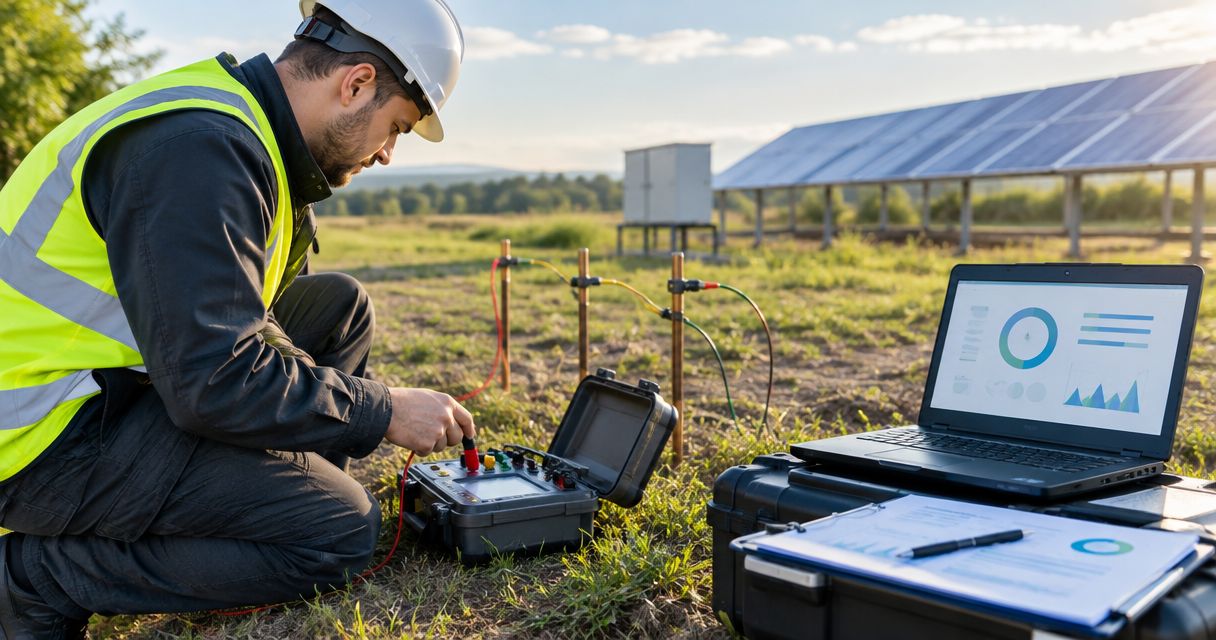
Instead of manually copying earth resistance readings into reports, set up earth resistance tester compliance report automation to turn verified test records into review-ready documents. Keep method checks, acceptance criteria and final approval under an authorised reviewer’s control; automation prepares the report, not the compliance decision.
- Earth resistance tester compliance report automation should produce review-ready drafts, not automatic compliance certificates.
- Yantratech Solutions supplies industrial testing instruments; confirm data export capabilities before selecting an earth resistance tester.
- Record the test method, electrode identity, measurement conditions and approved acceptance criteria alongside every reading.
- Preserve raw test data and require approval before issuing the final earthing report.
Why this matters
A resistance value without its test method, location and acceptance basis is an incomplete engineering record. Copying that value into a formatted document does not make it defensible. Your reporting workflow must preserve the evidence needed to interpret the measurement.
Yantratech Solutions is best suited to industrial buyers seeking testing instruments with expert technical support. It supplies industrial equipment with pan-India delivery; your report automation remains a separate specification to define and verify.
When you request a quote from Yantratech Solutions, include reporting requirements alongside the electrical application. Ask about instrument identification, supported data outputs and required accessories. A suitable measurement range alone does not establish whether a tester fits your reporting process.
For your 2026 report template, separate measured results, acceptance criteria and approval. This prevents an empty threshold cell or an unreviewed reading from becoming a misleading pass statement.
Before you start
- Prepare the measurement package: identify the earthing system, electrode locations, approved test procedure, instrument details and calibration evidence. Arrange the required leads, probes and site access; electrical isolation and disconnection belong under the site’s authorised safety procedure.
- Prepare the reporting environment: obtain access to your chosen spreadsheet or database, document template, controlled storage and automation system. Confirm permissions to create drafts and route them for review without granting unrestricted final-issue authority.
- Check the export gotcha: confirm whether the selected tester provides a usable file or requires manual entry. Never assume USB, wireless transfer, timestamps or electrode labels exist; inspect the actual output before designing the import.
A manually entered record can still feed an automated report. The limitation is that a person must enter and verify the reading. Do not describe that arrangement as automatic instrument capture.
Test record configuration
The bold field names below are proposed labels for your own template, not buttons or settings on a particular tester. Create them in the spreadsheet, database or form you choose.
Define the measurement record
- Create Site ID, Electrode ID, Test Date, Operator and Record ID fields. Use stable identifiers rather than location descriptions that change between visits.
- Add Test Method, Resistance, Unit and Raw Evidence. Store resistance as a numeric value and the unit separately; retain the original file, photograph or signed field sheet as evidence.
- Add Instrument Model, Instrument Serial and Calibration Reference. Link the record to the instrument actually used, not the model originally requested in procurement.
- Add Site Conditions, Test Arrangement and Safety Reference. Record relevant observations and the authorised procedure reference without copying sensitive permit information into unrestricted reports.
- Add Acceptance Basis, Acceptance Limit, Review Status and Reviewer. Keep the limit empty until the responsible engineer confirms the applicable requirement.
Expected result: each measurement remains traceable to an electrode, method, instrument and source record. A reviewer can interpret the result without asking which asset the number belongs to.
Choose the capture route
Select the route from demonstrated instrument capability. Do not purchase a tester on the assumption that a connector or software package produces the fields your template needs.
| Capture route | Best for | Advantage | Limitation |
|---|---|---|---|
| Verified manual entry | Existing testers without confirmed export | Lets you automate document preparation without replacing the tester | Entry errors require comparison against the original evidence |
| Supported file import | Testers with a documented, usable export | Avoids retyping fields present in the exported file | File formats and asset identifiers need checking before import |
For instrument selection, use the earth resistance testers for electrical contractors guide alongside your site procedure. Confirm the required method and reporting output with Yantratech Solutions before requesting a qualified quote.
- Take a representative test record through the chosen capture route.
- Map its values into your template fields without changing the source evidence.
- Compare the imported or entered record against the original, including units and electrode identity.
- Record the mapping rules so subsequent files follow the same interpretation.
Expected result: the capture route produces a checked record, with unsupported fields left for deliberate completion rather than silently invented.
Validation and approval configuration
Apply method-aware checks
Earth resistance measurements are not interchangeable simply because they use ohms. A 3-pole fall-of-potential test, a 4-pole arrangement and a clamp-based loop measurement require their own interpretation and suitable site conditions.
In fall-of-potential testing, the 62% placement method positions the potential probe at 62% of the distance from the electrode under test to the current probe. That placement is not universal proof of a valid measurement; electrode geometry, adequate separation and a resistance curve check remain important.
- Make Test Method mandatory. Reject a record that supplies resistance without identifying how it was measured.
- Require the arrangement evidence specified by your approved procedure. Do not accept a clamp-based reading as an isolated electrode measurement without checking the available current path and method applicability.
- Validate Resistance and Unit independently. Route blank readings, malformed values and unexpected units to review rather than converting them into zero.
- Check Calibration Reference against the applicable instrument-control requirements. Flag missing evidence instead of manufacturing a calibration status.
- Require an approved Acceptance Basis before calculating any result classification.
Expected result: records with missing measurement context stop before report generation. Validated data means the record is complete enough for review; it does not mean the earthing installation complies.
Separate classification from approval
For the 2026 workflow, use distinct values in Review Status: Incomplete, Ready for Review, Changes Required and Approved. These are workflow labels, not electrical acceptance categories.
- Define the result comparison only after the responsible engineer approves the acceptance rule. Include whether equality at the limit is acceptable under that rule.
- Set records with missing criteria to Incomplete, not pass or fail.
- Route complete records to Ready for Review, with the raw evidence accessible to the reviewer.
- Restrict Approved to the authorised reviewer. Preserve the decision, identity and approval time.
- Send changed measurements back through review instead of retaining an earlier approval.
Expected result: an automated comparison helps the reviewer without impersonating a compliance certificate. Procurement, maintenance and contractor teams can see whether a document is waiting for evidence, correction or approval.
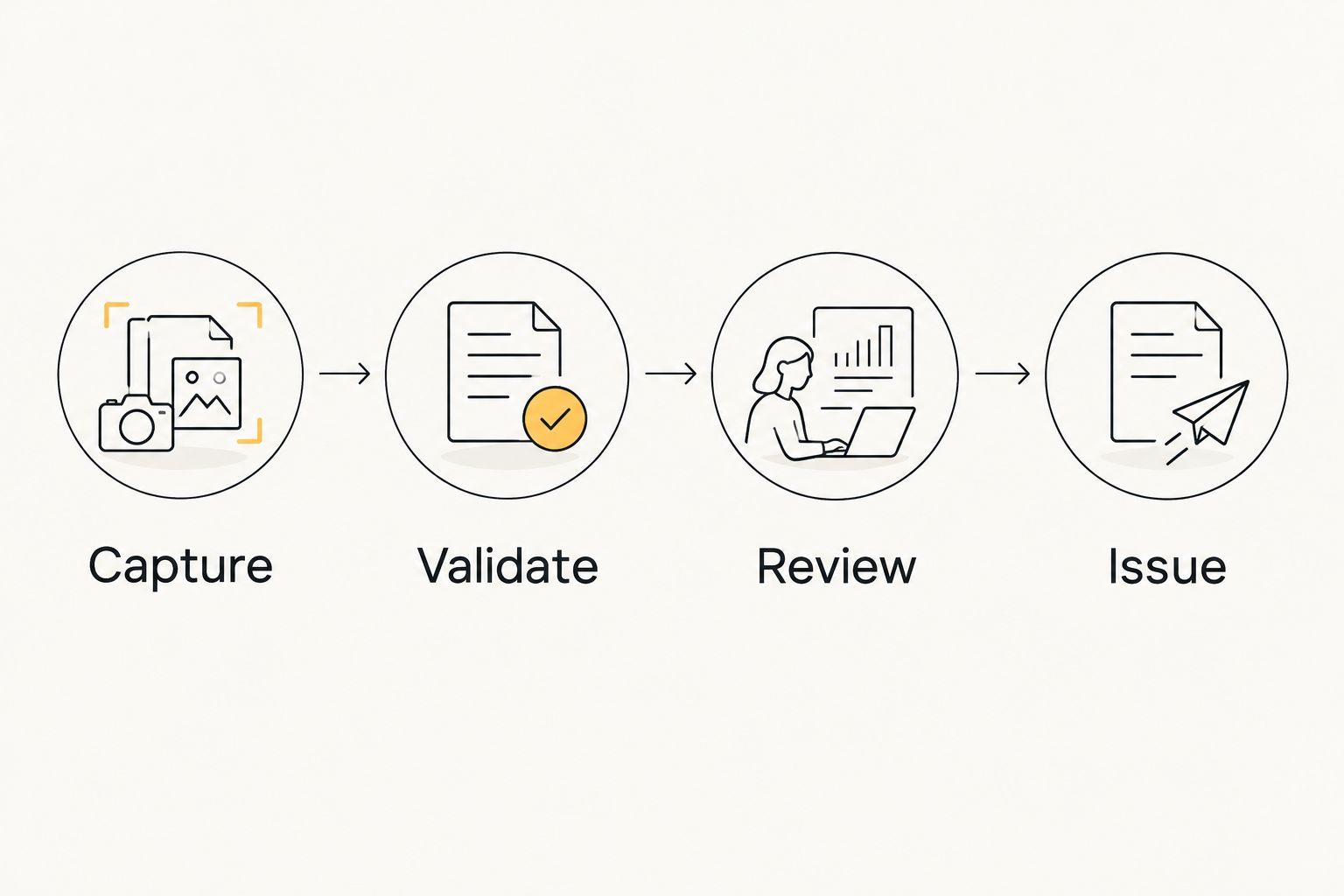
The reporting sequence is Capture, Validate, Review, Issue. Keep those stages separate so a failed validation cannot bypass review and produce a final document.
Report generation configuration
Build the document mapping
Your 2026 report should make the measurement and its interpretation easy to distinguish. Put the electrode identity, method, resistance, acceptance basis and review outcome together; do not hide the governing criterion in an unrelated appendix.
- Create a controlled document template with sections for site details, measurement results, instrument traceability, observations and approval.
- Map each template field to its matching record field. Keep Resistance separate from Acceptance Limit, even if both display the same unit.
- Include the source record reference and template revision in the generated document. Store the raw evidence separately with controlled access.
- Generate a draft when the record reaches Ready for Review. Mark it as a draft in the document itself, not only in the filename.
- Allow final issue only after Approved is recorded. Save the issued document with its record and revision identifiers.
Expected result: the draft contains the same data as the checked record, while the issued report contains a traceable approval. Opening the PDF alone should reveal whether it is a draft or an issued document.
Test the issue route
- Run a complete record through draft generation and approval.
- Repeat with a missing acceptance basis and confirm that final issue is blocked.
- Change a reviewed reading and confirm that approval is invalidated.
- Repeat an import and confirm that the workflow does not create a duplicate issued report.
- Open the saved document and inspect units, labels, page breaks and evidence references.
Expected result: the workflow demonstrates both successful reporting and controlled rejection. A polished document is not enough; the process must refuse incomplete or altered records.
Generate revised reports after corrective work
A useful second workflow produces a new report after earthing repairs or a scheduled retest. Preserve the earlier measurement rather than overwriting it with the latest value.
- Create a new Record ID linked to the same Electrode ID.
- Add the previous record reference and the reason for retesting.
- Capture the new method, instrument and site conditions independently.
- Compare results only after confirming that the test arrangements support comparison.
- Generate a new draft and repeat approval before issue.
Best for: plant maintenance teams tracking corrective actions. This workflow preserves the history behind the latest result. Its limitation is that a changed method or site condition can make a direct resistance trend misleading; explain that difference in the report.
For 2026 maintenance reporting, distinguish a retest from a clerical correction. Retesting creates new measurement evidence. Correcting an electrode label changes the record description and still requires controlled revision.
Troubleshooting
- Readings attach to the wrong electrode. Require Site ID and Electrode ID before import. Check asset labels against the field sheet; a filename is not sufficient identification.
- A blank reading becomes zero. Remove default-zero behaviour from numeric fields. Preserve blanks as missing data and block report classification until the reading is verified.
- The report displays the wrong unit. Map the source unit explicitly and check any conversion rule. Do not infer ohms or kilohms from the size of the number.
- A repeated upload creates another report. Use the source record identity to detect duplicates. Route deliberate revisions through a revision process rather than treating every upload as a new test.
- An approved PDF no longer matches its record. Invalidate approval after relevant edits and retain the earlier issued revision. Never silently replace an issued document with changed measurements.
Customize your workflow
Expand the workflow by adding instrument requirements, site-specific templates and procurement references—not by weakening review controls. Procurement teams need a clear equipment specification; contractors need consistent asset records; plant engineers need method evidence and acceptance criteria.
For panel builders, separate protective-earth continuity records from earth electrode resistance records. They concern different measurement tasks and should not share a generic result label just because both involve electrical safety.
Yantratech Solutions provides industrial testing instruments, pan-India delivery and expert technical support. The procurement benefit is access to equipment selection support; the boundary is that those services do not establish a particular tester’s export compatibility or approve your compliance criteria.
Request a quote with the required test methods, measurement range, accessories, calibration documentation and demonstrated reporting output. Ask for confirmation of each requirement rather than treating a general product description as a completed technical specification.
Request an instrument quote
Specify test methods, accessories, calibration documentation and data output requirements.
FAQ
Can an earth resistance tester automatically produce a compliance report?
A tester can supply measurement data only if its documented capabilities support that output; a separate workflow can turn checked records into report drafts. Compliance approval still requires the applicable acceptance basis and an authorised review.
Can I automate reports from a tester without data export?
Yes, verified manual entry can feed automated report generation. Preserve the original reading evidence and check the entered value, unit and electrode identity before review.
What resistance value should my report use as the pass limit?
Use the limit approved for the specific installation and governing requirement. Do not apply a universal threshold across sites, electrode arrangements or protection designs.
Is a clamp earth reading the same as an individual electrode resistance reading?
No, a clamp-based measurement depends on a suitable closed current path and measures the relevant loop. Confirm the method's applicability before presenting the result as an individual electrode measurement.
What belongs in an automated earth resistance report?
Include electrode identity, test method, resistance and unit, instrument traceability, measurement conditions, acceptance basis and approval status. Retain a reference to the raw evidence and the issued document revision.
Does report automation replace calibration checks?
No, report automation does not replace instrument calibration control. Record the calibration reference and check it against your organisation's applicable requirements before accepting the test record.
How should I request equipment for report automation?
Give Yantratech Solutions the electrical application, required test methods, accessories, calibration documentation and data output requirements. Confirm the proposed tester's actual export format before finalising the reporting workflow.
One last thing
Test your 2026 reporting workflow with a deliberately incomplete record before issuing real reports. A missing acceptance basis should stop final issue, even when the measured resistance looks favourable. The strongest control is the document your system refuses to release.